You set up Cloudflare Tunnel. You pointed it at Nginx Proxy Manager. You enabled Force SSL on your proxy hosts. You open the subdomain and get:
Safari can’t open the page — too many redirections.
No misconfigured DNS. No typo in the tunnel config. The issue is one checkbox you didn’t know existed.
How the redirect loop forms
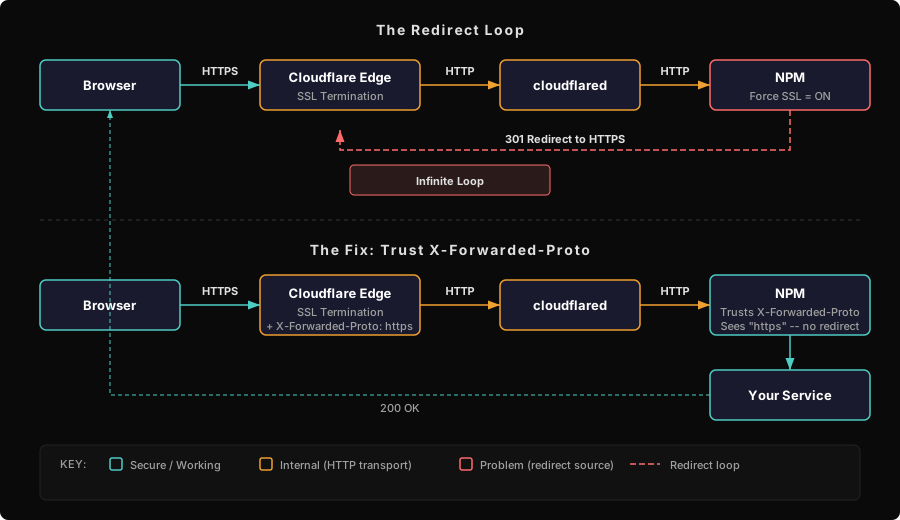
The traffic path looks like this:
Browser → Cloudflare Edge (HTTPS) → cloudflared tunnel → NPM (HTTP on port 80) → your serviceCloudflare handles SSL termination at the edge. It then forwards the request to your tunnel as plain HTTP — because that’s the internal transport. NPM receives an HTTP request, sees that Force SSL is enabled, and redirects to HTTPS. That HTTPS request arrives at Cloudflare, gets forwarded to the tunnel as HTTP again. Repeat forever.
The fix is telling NPM to trust the X-Forwarded-Proto header that Cloudflare sends. When NPM sees X-Forwarded-Proto: https, it knows the original request was already secure and skips the redirect.
The fix
In NPM, open each proxy host → Advanced tab → enable Trust Forwarded Proto.
That’s it. The redirect loop stops immediately.
The catch: the NPM API doesn’t set this by default
If you created your proxy hosts through the NPM UI, you probably already have this set — the UI enables it automatically for Cloudflare-proxied domains.
If you created hosts via the NPM REST API (useful for scripted homelab setups), trust_forwarded_proto defaults to false. You have to pass it explicitly:
{
  "domain_names": ["wallos.yourdomain.com"],
  "forward_host": "host.docker.internal",
  "forward_port": 8282,
  "forward_scheme": "http",
  "ssl_forced": true,
  "trust_forwarded_proto": true
}
If you’ve scripted host creation and skipped this field, every new service will hit the same redirect loop until you track it down again.
Debugging checklist
If you’re getting redirect loops through a Cloudflare Tunnel → NPM setup:
- Check Trust Forwarded Proto — NPM proxy host → Advanced → enabled?
- Check Cloudflare SSL mode — should be Full (strict), not Flexible. Flexible creates its own redirect loops independently of this issue.
- Check the forward scheme — if NPM is forwarding to your service over HTTPS with a self-signed cert, enable Disable Certificate Verification on that host.
- Check for loops at the service level — some apps do their own HTTP → HTTPS redirect internally. Same root cause, same fix: the app needs to trust
X-Forwarded-Prototoo.
Two services, same root cause
This issue doesn’t always look like a redirect loop. Authentik, for example, produces a different symptom from the same underlying problem.
When Authentik sits behind NPM and doesn’t trust the forwarded proto, it generates OAuth redirect URIs with http:// instead of https://. Google OAuth rejects http redirect URIs outright — so instead of a redirect loop, you get a redirect_uri_mismatch error. Different error message, identical cause.
The fix in Authentik’s compose:
environment:
  AUTHENTIK_LISTEN__TRUSTED_PROXY_CIDRS: "0.0.0.0/0"
And in NPM’s advanced config for the Authentik proxy host:
proxy_set_header X-Forwarded-Proto "https";The pattern generalizes: any service behind a Cloudflare Tunnel that makes decisions based on the request protocol — redirects, OAuth URIs, cookie security flags, HSTS enforcement — needs to know the original request was HTTPS. The tunnel strips that information. X-Forwarded-Proto puts it back.
When you’re behind a Cloudflare Tunnel, your services never see a raw HTTPS request — only the forwarded header tells them what the client actually used. Everything downstream needs to trust that header, or it’ll second-guess the protocol and break in ways that look nothing like the root cause.