I use Claude Code on two machines. One is personal — a home lab Mac Mini where I build projects, manage infrastructure, and write. The other is a work machine with a completely different auth setup. Different device, different profile, no shared filesystem.
The problem: Claude Code doesn’t know who I am when I switch machines. I’ve spent months building up context — a persona file that describes how I think and communicate, agent definitions that encode how I want code reviewed or documentation written, preferences for tone and structure that make Claude actually useful instead of generically helpful. On the personal machine, it works beautifully. On the work machine, I start from zero every time.
I wanted my context to follow me.
The plan I almost built
Late one night, I drafted a four-part system:
- Obsidian Git Plugin syncing a
context-library/folder from my Obsidian vault to a private GitHub repo on every save - A custom MCP server running on my Mac Mini, using the GitHub API to fetch context files and serve them to Claude Code as tool responses
- An HTTP bridge wrapping the MCP server in an Express app so it could be accessed remotely
- Cloudflare Tunnel + SSO exposing the HTTP bridge at
context.mydomain.com, gated behind my existing authentication stack
It was well-designed. The MCP server had three tools — get_context for fetching specific files, list_context for browsing the library, and search_context for keyword lookup. The HTTP bridge had bearer token auth. I even had a launchd plist drafted for running it as a background service on the Mac Mini.
It looked like this:
Obsidian → GitHub (private repo)
                  ↓
           Mac Mini MCP server  ←→ Claude Code (local)
                  ↓
         Cloudflare Tunnel + SSO
                  ↓
           Work machine  ←→ Claude Code (remote)
I was one npm init away from building it.
The question that killed it
Before starting, I asked myself the question I tell Claude to ask me: what are you actually trying to solve?
The answer was simple: I want my persona, preferences, and agent definitions available when Claude Code starts a session — on any machine.
Not dynamically. Not searchable. Not over HTTP. I don’t need to pull different personas mid-conversation or query my context library from my phone. I just need Claude to know who I am when the session begins.
Claude Code already has a mechanism for this: a file called CLAUDE.md in your home directory at ~/.claude/CLAUDE.md. It loads automatically at the start of every session, on every project. It’s the global system prompt.
The entire problem is: that file exists on one machine and not the other.
The solution that actually shipped
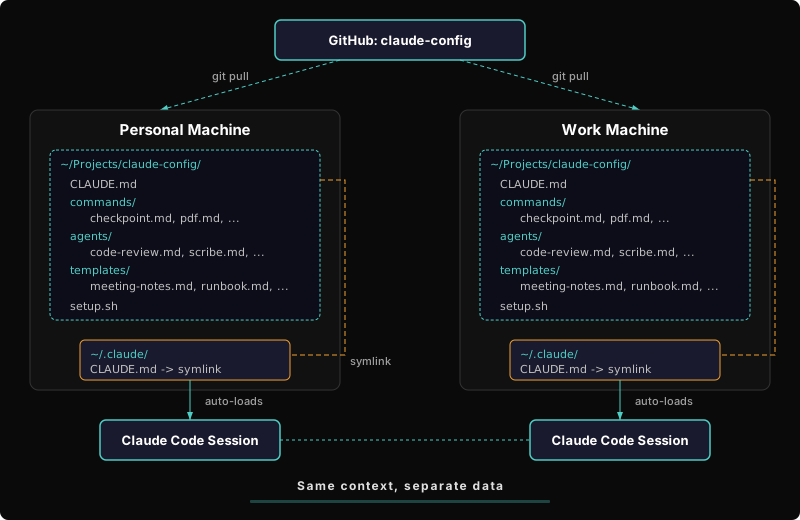
A private GitHub repo with my context files, cloned on both machines, symlinked to ~/.claude/CLAUDE.md.
# One-time setup on each machine
git clone https://github.com/youruser/claude-context.git ~/Projects/claude-context
ln -sf ~/Projects/claude-context/CLAUDE.md ~/.claude/CLAUDE.md
That’s it. Two commands.
The repo looks like this:
claude-context/
├── CLAUDE.md                    ← symlinked to ~/.claude/CLAUDE.md
├── personas/
│   └── charlie-seay.md          ← full persona reference
└── agents/
    ├── code-review.md
    ├── scribe.md
    ├── editor.md
    ├── tech-spec.md
    ├── research.md
    └── test-results-analyzer.md
The CLAUDE.md file contains everything Claude needs to load at session start: who I am, how I communicate, my working style and preferences, writing registers (I write differently for documentation than I do for blog posts — and I want Claude to match that), a summary of each agent’s capabilities, and the rules for how we work together.
The agent files have full definitions if Claude needs deeper context for a specific task, but the summaries in CLAUDE.md cover 90% of sessions.
To sync: edit on either machine, git push, git pull on the other. I added it to my existing checkpoint script so it pushes alongside my other repos automatically.
What goes in the portable file and what stays local
This was the harder design decision — not how to sync, but what to sync. I have 15 agent definitions, detailed infrastructure notes, project-specific context, and a full memory system. Most of it is useless on the work machine.
Portable (goes in the repo):
- My persona — professional arc, working style, communication preferences
- The “how to work with me” rules — push back on bad ideas, question everything, accuracy over agreeableness
- Writing registers — four distinct voices for different contexts, with defaults
- General-purpose agents — code review, technical writing, editing, specs, research, test analysis
- Multi-model routing preferences — when to use Claude vs. other tools
Stays local (project-specific, not portable):
- Home lab infrastructure details (ports, IPs, Docker configs)
- Personal project agents (home lab ops, content distribution, app store optimization)
- Accumulated memory about specific projects
- Vault-specific configuration
The dividing line: if it describes how I work, it’s portable. If it describes what I’m working on, it stays local.
Why the MCP server was wrong
The MCP approach wasn’t technically flawed — it would have worked. But it violated a principle I apply to every build: is this the simplest solution that works?
An MCP server makes sense when you need dynamic, queryable context — switching personas mid-conversation, searching across hundreds of documents, pulling different context based on the task. If I had a team of people each with their own profiles, or if my context library were large enough that loading it all at once was wasteful, MCP would be the right tool.
But my use case is one person, one file, loaded once at session start. The “dynamic” part is git pull.
Here’s the infrastructure I avoided deploying:
| Planned | Purpose | Actually needed? |
|---|---|---|
| Obsidian Git plugin | Auto-sync vault to GitHub | No — I already push manually via checkpoint |
| Node.js MCP server | Serve context files via GitHub API | No — files load from disk |
| Express HTTP bridge | Remote access to MCP tools | No — both machines have Git |
| Cloudflare Tunnel rule | Expose bridge to the internet | No — nothing to expose |
launchd service | Keep MCP server running | No — nothing to keep running |
| Fine-grained PAT | Scope GitHub API access | No — standard Git auth is fine |
| Bearer token auth | Protect the HTTP bridge | No — no HTTP bridge |
Seven components, zero needed. The solution is a symlink.
The general pattern
If you’re using Claude Code on multiple machines and want consistent behavior, here’s the pattern:
- Create a private GitHub repo with a
CLAUDE.mdfile containing your preferences, communication style, and any agent definitions you want available everywhere - Clone it on each machine and symlink
CLAUDE.mdto~/.claude/CLAUDE.md - Keep project-specific context in project-level
CLAUDE.mdfiles — these live in each project’s repo and load automatically when you’re working in that directory - Sync with
git push/git pull— or add it to whatever deployment script you already use
The layering is clean: global context (who you are) loads from ~/.claude/CLAUDE.md, project context (what you’re building) loads from the project’s CLAUDE.md, and Claude merges both. You don’t have to choose between portable and specific — you get both.
The lesson, again
Every infrastructure problem looks like it needs infrastructure. An MCP server is a cool tool — I’ve built them for other things and they’re genuinely useful. But “I have a tool I like using” is not the same as “this problem needs this tool.”
The question that saves you from overengineering is always the same: what am I actually trying to solve? If the answer fits in a sentence, the solution probably fits in a command.