Every API has a free tier until it doesn’t. Every cloud service is reliable until it isn’t. And every AI provider is affordable until the pricing page changes.
This isn’t about paranoia. It’s about optionality. If Anthropic raises prices, Google kills Gemini’s free tier, or you just want to work from a cabin with no signal — do you have a playbook?
I built one. Here’s the framework.
The audit
For every cloud dependency in your stack, document four things:
- What it does — the actual function, not the product name
- What local replacement exists — specific tool, not “something open source”
- What hardware it needs — RAM, VRAM, storage, with specific quantities
- What it costs — real pricing, verified, not “about $2K”
Here’s what that looks like for an AI-heavy stack running on a Mac Mini M4 Pro:
AI services
| Function | Cloud Provider | Local Alternative | RAM Needed |
|---|---|---|---|
| Coding assistant | Claude Code | Ollama + Aider + Qwen 2.5 Coder 32B | 48GB+ |
| App LLM (formatting) | Gemini 2.0 Flash | Ollama + Llama 3.3 70B Q4 | 48GB+ |
| App LLM (fallback) | Groq / Llama 3.3 70B | Same local Ollama instance | (same) |
| Image generation | Pollinations / Stable Horde | FLUX.1 or SDXL via ComfyUI | 16GB+ |
| Streaming story gen | Gemini 2.0 Flash | Ollama + Llama 3.3 70B Q4 | 48GB+ |
Infrastructure
| Function | Cloud Provider | Local Alternative | Effort |
|---|---|---|---|
| Git hosting | GitHub | Gitea or Forgejo (Docker) | Low |
| DNS + routing | Cloudflare Tunnel | dnsmasq + mDNS | Medium |
| SSL certificates | Cloudflare (auto) | mkcert (local CA) | Low |
| Auth (SSO) | Google OAuth | Authentik local passwords | Low |
| Container registry | Docker Hub | Local registry:2 + pre-pulled images | Low |
| Package manager | npm / Homebrew | Verdaccio + cached bottles | Low |
What’s already offline
This is the part most people skip. Before buying anything, check what’s already local:
- Docker, containers, reverse proxy — already running on your machine
- IDE — VSCode, Xcode, everything that matters is local
- IaC tools — OpenTofu, Terraform, Ansible — all local binaries
- Media server — Plex/Jellyfin playback is local (metadata calls aside)
In my case, about 80% of the infrastructure stack is already offline-capable. The 20% that isn’t is almost entirely AI and DNS.
What fits in your RAM
This is the question. Everything else is details.
24GB (M4 Pro base)
You can run today — no upgrades needed:
- Qwen 2.5 Coder 7B (Q8) — ~5GB, good for single-file edits and autocomplete
- Qwen 3 14B (Q4) — ~9GB, strong reasoning with
/thinkmode - SDXL 1.0 — ~8GB, mature ecosystem, 4-12s per image
The catch: one model at a time. Running a coding model and an image generator simultaneously will swap.
48GB (upgrade sweet spot)
- Qwen 2.5 Coder 32B (Q4) — ~20GB, 92.7% HumanEval, matches GPT-4o on code benchmarks
- Gemma 3 40B (Q4) — ~24GB, 128K context, great for content generation
- FLUX.1 Schnell — ~16GB, high-quality image gen in 30-60s
You can run a coding model or a creative model with headroom. Not both simultaneously.
64GB (the real sweet spot)
- Llama 3.3 70B (Q4) — ~40GB, with ~20GB headroom for OS, apps, and a second model
- Two models loaded at once — coding + creative, no swapping
- FLUX.1 Dev alongside an active LLM
The jump from 48GB to 64GB is only ~$400 on Apple’s configurator but unlocks 70B models and multi-model workflows. This is the tier where local AI stops feeling like a compromise.
The models that matter in 2026
For coding
Qwen 2.5 Coder 32B is the answer for most people. 128K context window, 92.7% on HumanEval, 73.7% on the Aider benchmark. It handles multi-file edits, refactoring, and test generation well.
Qwen3 Coder 30B-A3B is the wildcard — a Mixture of Experts model where only 3.3B parameters are active per token. It needs ~12GB of RAM despite being a “30B” model. If you’re RAM-constrained, this is the one to watch.
For autocomplete specifically, Qwen 2.5 Coder 7B at Q8 quantization is fast enough for tab completion and fits alongside larger models.
For creative text
Llama 3.3 70B (Q4) for maximum quality if you have the RAM. Gemma 3 40B for 128K context at lower memory cost. Both handle structured JSON output — critical if your app needs parseable responses, not just prose.
Ollama supports constrained JSON output natively now. You can pass a JSON schema in the API call and the model’s output will conform to it. This matters more than benchmark scores for production use.
For image generation
On Apple Silicon, Draw Things is the fastest runtime — 25% faster than mflux for FLUX models, with optimized Metal FlashAttention 2.0. For Stable Diffusion, Mochi Diffusion uses Core ML and the Neural Engine, running at ~150MB memory.
Reality check: Apple Silicon is 2-4x slower than NVIDIA GPUs for image generation. If you’re generating dozens of images per session, this is where a Linux GPU box pays for itself.
The tools that wire it together
The model is only half the equation. You need the tooling layer:
| Layer | Tool | What it does |
|---|---|---|
| Model runtime | Ollama | Serves models via OpenAI-compatible API. One command to download and run any model. |
| CLI coding agent | Aider | Git-native AI pair programmer. Applies diffs, understands repo context. Connects to Ollama. |
| VSCode integration | Continue.dev | Model routing — small fast model for autocomplete, big model for chat/reasoning. |
| Image generation | Draw Things or ComfyUI | Native macOS app or node-based workflow. Both support FLUX and SDXL. |
| Chat interface | Open WebUI | ChatGPT-style web UI for any Ollama model. Docker one-liner. |
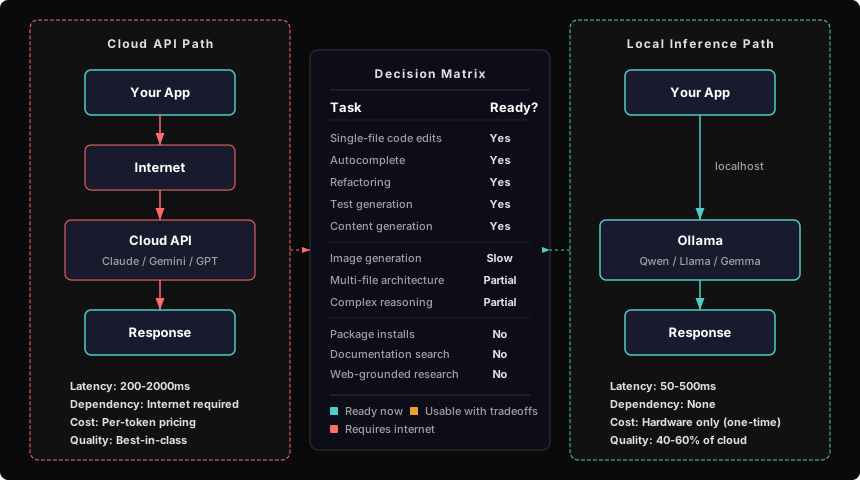
The key insight: Ollama’s OpenAI-compatible API means your code barely changes. If you’re already calling https://api.groq.com/openai/v1/chat/completions, switching to http://localhost:11434/v1/chat/completions is a one-line change. Same request format, same streaming SSE response format.
Hardware costs (verified March 2026)
| Option | Config | Price | Best for |
|---|---|---|---|
| Mac Mini M4 Pro 48GB | 14C/20G, 1TB | $1,999 | Running 32B coding models comfortably |
| Mac Mini M4 Pro 64GB | 14C/20G, 1TB | ~$2,399 | 70B models + multi-model workflows |
| Used RTX 3090 | 24GB VRAM | $650-840 | Cheapest path to serious VRAM ($33/GB) |
| Linux GPU box | Workstation + 3090 | $1,200-2,000 | Fast inference, image gen |
| Mac Studio M3 Ultra | 192GB unified | $5,499 | Overkill, but no compromises |
If you already have a 24GB Mac, selling it covers $400-500 toward the upgrade. Net cost for the 64GB sweet spot: around $1,900-2,000.
Note on used GPU pricing: tariffs are expected to push used RTX 3090 prices up 10-20% in Q1-Q2 2026. If you’re going the Linux route, sooner is cheaper.
What’s not ready yet
Honest assessment. Skip this section if you only want good news.
Local coding assistants are at maybe 40-60% of Claude Code capability for complex tasks. Single-file edits, refactoring, debugging, test writing — fine. “Build me a full authentication system across 12 files in one session” — not fine. Qwen 2.5 Coder 32B matches GPT-4o on benchmarks, but benchmarks aren’t multi-file architectural reasoning.
Image generation on Apple Silicon is slow. FLUX.1 Schnell takes 30-60 seconds per image on M4 Pro. If your workflow generates 20+ images per session, you’ll feel it. A $700 used RTX 3090 cuts that to 5-10 seconds.
Package managers need internet. npm, pip, Homebrew — they all phone home. You can cache with Verdaccio (npm) or pre-download bottles (Homebrew), but it’s maintenance overhead you don’t have today.
Documentation and search are the silent dependency. Stack Overflow, MDN, Apple Developer docs — you don’t realize how often you reach for them until you can’t. Pre-downloading docs is possible but tedious. This might be the hardest thing to replace.
The framework, not the answer
The specific models and prices in this post will age. The framework won’t:
- Audit every cloud dependency
- Identify the local replacement with specific hardware requirements
- Price the hardware honestly
- Be honest about what doesn’t work yet
- Update the audit every time you add a new dependency
I keep a living document that gets updated every time I touch the stack. When a dependency changes, the offline alternative gets re-evaluated. It’s not a one-time exercise — it’s a habit.
The goal isn’t to go offline tomorrow. It’s to know that you could.
This is Part 1 of the Off the Grid series. Next up: actually running the dev workflow offline for a week and documenting what breaks.